


SPI Lcd8 (8-bit interface) Library
The mikroBasic PRO for 8051 provides a library for communication with Lcd (with HD44780 compliant controllers) in 8-bit mode via SPI interface.
For creating a custom set of Lcd characters use Lcd Custom Character Tool.
Note: Library uses the SPI module for communication. The user must initialize the SPI module before using the SPI Lcd Library.
Note: This Library is designed to work with mikroElektronika's Serial Lcd/Glcd Adapter Board pinout, see schematic at the bottom of this page for details.
External dependencies of SPI Lcd Library
The implementation of SPI Lcd Library routines is based on Port Expander Library routines.
External dependencies are the same as Port Expander Library external dependencies.
Library Routines
SPI_Lcd8_Config
| Prototype |
sub procedure SPI_Lcd8_Config(dim DeviceAddress as byte) |
|---|---|
| Returns |
Nothing. |
| Description |
Initializes the Lcd module via SPI interface. Parameters :
|
| Requires |
The SPI module needs to be initialized. See SPIx_Init and SPIx_Init_Advanced routines. |
| Example |
' port expander pinout definition
dim SPExpanderCS as sbit at P1_1_bit
    SPExpanderRST as sbit at P1_0_bit
...
SPI1_Init()                                ' initialize SPI interface
SPI_Lcd8_Config(0)                         ' intialize Lcd in 8bit mode via SPIs
|
SPI_Lcd8_Out
| Prototype |
sub procedure SPI_Lcd8_Out(dim row as byte, dim column as byte, dim byref text as string[19]) |
|---|---|
| Returns |
Nothing. |
| Description |
Prints text on Lcd starting from specified position. Both string variables and literals can be passed as a text. Parameters :
|
| Requires |
Lcd needs to be initialized for SPI communication, see SPI_Lcd8_Config routines. |
| Example |
' Write text "Hello!" on Lcd starting from row 1, column 3: SPI_Lcd8_Out(1, 3, "Hello!") |
SPI_Lcd8_Out_Cp
| Prototype |
sub procedure SPI_Lcd8_Out_CP(dim text as string[19]) |
|---|---|
| Returns |
Nothing. |
| Description |
Prints text on Lcd at current cursor position. Both string variables and literals can be passed as a text. Parameters :
|
| Requires |
Lcd needs to be initialized for SPI communication, see SPI_Lcd8_Config routines. |
| Example |
' Write text "Here!" at current cursor position:
SPI_Lcd8_Out_CP("Here!")
|
SPI_Lcd8_Chr
| Prototype |
sub procedure SPI_Lcd8_Chr(dim Row as byte, dim Column as byte, dim Out_Char as byte) |
|---|---|
| Returns |
Nothing. |
| Description |
Prints character on Lcd at specified position. Both variables and literals can be passed as character. Parameters :
|
| Requires |
Lcd needs to be initialized for SPI communication, see SPI_Lcd8_Config routines. |
| Example |
' Write character "i" at row 2, column 3: SPI_Lcd8_Chr(2, 3, 'i') |
SPI_Lcd8_Chr_Cp
| Prototype |
sub procedure SPI_Lcd8_Chr_CP(dim Out_Char as byte) |
|---|---|
| Returns |
Nothing. |
| Description |
Prints character on Lcd at current cursor position. Both variables and literals can be passed as character. Parameters :
|
| Requires |
Lcd needs to be initialized for SPI communication, see SPI_Lcd8_Config routines. |
| Example |
Print “e” at current cursor position:
' Write character "e" at current cursor position:
SPI_Lcd8_Chr_Cp('e')
|
SPI_Lcd8_Cmd
| Prototype |
sub procedure SPI_Lcd8_Cmd(dim out_char as byte) |
|---|---|
| Returns |
Nothing. |
| Description |
Sends command to Lcd. Parameters :
Note: Predefined constants can be passed to the function, see Available Lcd Commands. |
| Requires |
Lcd needs to be initialized for SPI communication, see SPI_Lcd8_Config routines. |
| Example |
' Clear Lcd display: SPI_Lcd8_Cmd(_LCD_CLEAR) |
Available Lcd Commands
| Lcd Command | Purpose |
|---|---|
| _LCD_FIRST_ROW | Move cursor to the 1st row |
| _LCD_SECOND_ROW | Move cursor to the 2nd row |
| _LCD_THIRD_ROW | Move cursor to the 3rd row |
| _LCD_FOURTH_ROW | Move cursor to the 4th row |
| _LCD_CLEAR | Clear display |
| _LCD_RETURN_HOME | Return cursor to home position, returns a shifted display to its original position. Display data RAM is unaffected. |
| _LCD_CURSOR_OFF | Turn off cursor |
| _LCD_UNDERLINE_ON | Underline cursor on |
| _LCD_BLINK_CURSOR_ON | Blink cursor on |
| _LCD_MOVE_CURSOR_LEFT | Move cursor left without changing display data RAM |
| _LCD_MOVE_CURSOR_RIGHT | Move cursor right without changing display data RAM |
| _LCD_TURN_ON | Turn Lcd display on |
| _LCD_TURN_OFF | Turn Lcd display off |
| _LCD_SHIFT_LEFT | Shift display left without changing display data RAM |
| _LCD_SHIFT_RIGHT | Shift display right without changing display data RAM |
Library Example
This example demonstrates how to communicate Lcd in 8-bit mode via the SPI module, using serial to parallel convertor MCP23S17.
program SPI_LCD8_Test

dim text as char[16]
dim counter as byte
' Port Expander module connections
dim SPExpanderRST as sbit at P1_0_bit
dim SPExpanderCS  as sbit at P1_1_bit
' End Port Expander module connections

sub procedure Move_Delay()                  ' Function used for text moving
  Delay_ms(500)                             ' You can change the moving speed here
end sub

main:
  text = "mikroE"

  SPI1_Init()                               ' Initialize SPI interface

  '  If Port Expander Library uses SPI2 module
  '  SPI2_Init()                            ' Initialize SPI module used with PortExpander

  SPI_Lcd8_Config(0)                        ' Intialize Lcd in 8bit mode via SPI
  SPI_Lcd8_Cmd(_LCD_CLEAR)                  ' Clear display
  SPI_Lcd8_Cmd(_LCD_CURSOR_OFF)             ' Turn cursor off
  SPI_Lcd8_Out(1,6, text)                   ' Print text to Lcd, 1st row, 6th column...
  SPI_Lcd8_Chr_CP("!")                      ' Append "!"
  SPI_Lcd8_Out(2,1, "mikroelektronika")     ' Print text to Lcd, 2nd row, 1st column...

  ' SPI_Lcd8_Out(3,1, text)              ' For Lcd modules with more than two rows
  ' SPI_Lcd8_Out(4,15, text)             ' For Lcd modules with more than two rows

  Delay_ms(2000)

  ' Moving text
  for counter = 0 to 3                      ' Move text to the right 4 times
      SPI_Lcd8_Cmd(_LCD_SHIFT_RIGHT)
      Move_Delay()
  next counter

  while TRUE                                ' Endless loop
    for counter = 0 to 6                    ' Move text to the left 7 times
      SPI_Lcd8_Cmd(_LCD_SHIFT_LEFT)
      Move_Delay()
    next counter

    for counter = 0 to 6                    ' Move text to the right 7 times
      SPI_Lcd8_Cmd(_LCD_SHIFT_RIGHT)
      Move_Delay()
    next counter
  wend
end.
HW Connection
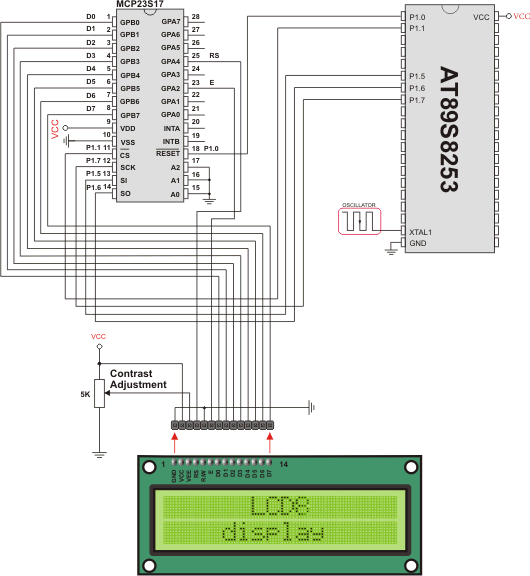
SPI LCD8 HW connection
What do you think about this topic ? Send us feedback!
Find them on
