


OneWire Library
The OneWire library provides routines for communication via the Dallas OneWire protocol, e.g. with DS18x20 digital thermometer. OneWire is a Master/Slave protocol, and all communication cabling required is a single wire. OneWire enabled devices should have open collector drivers (with single pull-up resistor) on the shared data line.
Slave devices on the OneWire bus can even get their power supply from data line. For detailed schematic see device datasheet.
Some basic characteristics of this protocol are:
- single master system,
- low cost,
- low transfer rates (up to 16 kbps),
- fairly long distances (up to 300 meters),
- small data transfer packages.
Each OneWire device has also a unique 64-bit registration number (8-bit device type, 48-bit serial number and 8-bit CRC), so multiple slaves can co-exist on the same bus.
Note: Oscillator frequency Fosc needs to be at least 8MHz in order to use the routines with Dallas digital thermometers.
External dependencies of OneWire Library
| This variable must be defined in any project that is using OneWire Library: | Description: | Example : |
|---|---|---|
dim OW_Bit as sbit bdata sfr external |
OneWire line. | dim OW_Bit as sbit at P2_7_bit |
Library Routines
Ow_Reset
| Prototype |
sub function Ow_Reset() as word |
|---|---|
| Returns |
|
| Description |
Issues OneWire reset signal for DS18x20. Parameters :
|
| Requires |
Devices compliant with the Dallas OneWire protocol. Global variable |
| Example |
' Issue Reset signal on One-Wire Bus Ow_Reset() |
Ow_Read
| Prototype |
sub function Ow_Read() as byte |
|---|---|
| Returns |
Data read from an external device over the OneWire bus. |
| Description |
Reads one byte of data via the OneWire bus. |
| Requires |
Devices compliant with the Dallas OneWire protocol. Global variable |
| Example |
' Read a byte from the One-Wire Bus dim read_data as byte ... read_data = Ow_Read() |
Ow_Write
| Prototype |
sub procedure Ow_Write(dim par as byte) |
|---|---|
| Returns |
Nothing. |
| Description |
Writes one byte of data via the OneWire bus. Parameters :
|
| Requires |
Devices compliant with the Dallas OneWire protocol. Global variable |
| Example |
' Send a byte to the One-Wire Bus Ow_Write(0xCC) |
Library Example
This example reads the temperature using DS18x20 connected to pin P1.2. After reset, MCU obtains temperature from the sensor and prints it on the Lcd. Make sure to pull-up P1.2 line and to turn off the P1 leds.
program OneWire

' lcd pinout definition
dim LCD_RS as sbit at P2_0_bit
dim LCD_EN as sbit at P2_1_bit

dim LCD_D4 as sbit at P2_2_bit
dim LCD_D5 as sbit at P2_3_bit
dim LCD_D6 as sbit at P2_4_bit
dim LCD_D7 as sbit at P2_5_bit
' end lcd definition

' OneWire pinout
dim OW_Bit as sbit at P1_2_bit
' end OneWire definition

'  Set TEMP_RESOLUTION to the corresponding resolution of used DS18x20 sensor:
'  18S20: 9  (default setting can be 9,10,11,or 12)
'  18B20: 12
const TEMP_RESOLUTION = 9

dim text as string[9]
    temp as word

sub procedure Display_Temperature(dim temp2write as word)
const RES_SHIFT = TEMP_RESOLUTION - 8

dim temp_whole as byte
    temp_fraction as word

  text = "000.0000"
  ' check if temperature is negative
  if (temp2write and 0x8000) then
    text[0] = "-"
    temp2write = not temp2write + 1
  end if

  ' extract temp_whole
  temp_whole = word(temp2write >> RES_SHIFT)

  ' convert temp_whole to characters
   if ( temp_whole div 100 ) then
       text[0] = temp_whole div 100  + 48
   else
     text[0] = "0"
   end if

  text[1] = (temp_whole div 10) mod 10 + 48        ' Extract tens digit
  text[2] =  temp_whole mod 10    + 48             ' Extract ones digit

  ' extract temp_fraction and convert it to unsigned int
  temp_fraction  =  word(temp2write << (4-RES_SHIFT))
  temp_fraction = temp_fraction and 0x000F
  temp_fraction = temp_fraction * 625


  ' convert temp_fraction to characters

  text[4] = word(temp_fraction div 1000)    + 48         ' Extract thousands digit
  text[5] = word((temp_fraction div 100)mod 10 + 48)     ' Extract hundreds digit
  text[6] = word((temp_fraction div 10)mod 10  + 48)     ' Extract tens digit
  text[7] = word(temp_fraction mod 10)      + 48         ' Extract ones digit

  ' print temperature on LCD
  Lcd_Out(2, 5, text)
end sub

main:
  Lcd_Init()                                ' Initialize LCD
  Lcd_Cmd(_LCD_CLEAR)                       ' Clear LCD
  Lcd_Cmd(_LCD_CURSOR_OFF)                  ' Turn cursor off
  Lcd_Out(1, 1, " Temperature:   ")

  Lcd_Chr(2,13,178)                         ' Print degree character, "C" for Centigrades
                                            ' different LCD displays have different char code for degree
  Lcd_Chr(2,14,"C")                         ' if you see greek alpha letter try typing 178 instead of 223

  '--- main loop
  while TRUE
  '--- perform temperature reading
    Ow_Reset()                              ' Onewire reset signal
    Ow_Write(0xCC)                          ' Issue command SKIP_ROM
    Ow_Write(0x44)                          ' Issue command CONVERT_T
    Delay_us(120)                           ' added to avoid first false reading
                                            '   upon powering up the device
    Ow_Reset()
    Ow_Write(0xCC)                          ' Issue command SKIP_ROM
    Ow_Write(0xBE)                          ' Issue command READ_SCRATCHPAD

    temp =  Ow_Read()
    temp = (Ow_Read() << 8) + temp

    '--- Format and display result on Lcd
    Display_Temperature(temp)
    Delay_ms(520)
  wend
end.
HW Connection
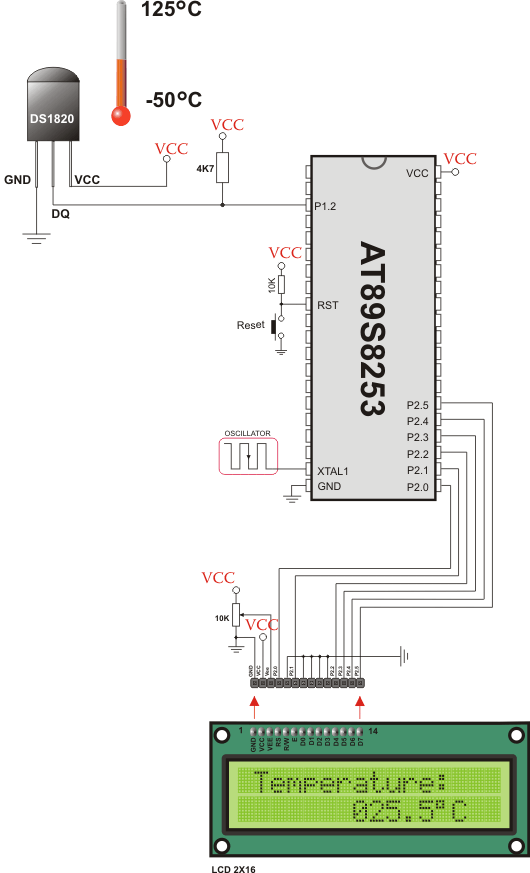
Example of DS1820 connection
What do you think about this topic ? Send us feedback!
Find them on
