


Keypad Library
The mikroBasic PRO for 8051 provides a library for working with 4x4 keypad. The library routines can also be used with 4x1, 4x2, or 4x3 keypad. For connections explanation see schematic at the bottom of this page.
Note: Since sampling lines for 8051 MCUs are activated by logical zero Keypad Library can not be used with hardwares that have protective diodes connected with anode to MCU side, such as mikroElektronika's Keypad extra board HW.Rev v1.20
External dependencies of Keypad Library
| The following variable must be defined in all projects using Keypad Library: | Description: | Example : |
|---|---|---|
dim keypadPort as byte external sfr |
Keypad Port. | dim keypadPort as byte at P0 |
Library Routines
Keypad_Init
| Prototype |
sub procedure Keypad_Init() |
|---|---|
| Returns |
Nothing. |
| Description |
Initializes port for working with keypad. |
| Requires |
|
| Example |
' Initialize P0 for communication with keypad dim keypadPort as byte at P0 ... Keypad_Init() |
Keypad_Key_Press
| Prototype |
sub function Keypad_Key_Press() as byte |
|---|---|
| Returns |
The code of a pressed key (1..16). If no key is pressed, returns 0. |
| Description |
Reads the key from keypad when key gets pressed. |
| Requires |
Port needs to be initialized for working with the Keypad library, see Keypad_Init. |
| Example |
dim kp as byte ... kp = Keypad_Key_Press() |
Keypad_Key_Click
| Prototype |
sub function Keypad_Key_Click() as byte |
|---|---|
| Returns |
The code of a clicked key (1..16). If no key is clicked, returns 0. |
| Description |
Call to |
| Requires |
Port needs to be initialized for working with the Keypad library, see Keypad_Init. |
| Example |
dim kp as byte ... kp = Keypad_Key_Click() |
Library Example
This is a simple example of using the Keypad Library. It supports keypads with 1..4 rows and 1..4 columns. The code being returned by Keypad_Key_Click() function is in range from 1..16. In this example, the code returned is transformed into ASCII codes [0..9,A..F] and displayed on Lcd. In addition, a small single-byte counter displays in the second Lcd row number of key presses.
program Keypad_Test

dim kp, cnt, oldstate as byte
    txt as string[6]

' Keypad module connections
dim keypadPort as byte at P0
' End Keypad module connections

' LCD pinout definition
dim LCD_RS as sbit at P2_0_bit
dim LCD_EN as sbit at P2_1_bit

dim LCD_D4 as sbit at P2_2_bit
dim LCD_D5 as sbit at P2_3_bit
dim LCD_D6 as sbit at P2_4_bit
dim LCD_D7 as sbit at P2_5_bit
' end LCD pinout definitions

main:
  oldstate = 0
  cnt = 0                                 ' Reset counter
  Keypad_Init()                           ' Initialize Keypad
  Lcd_Init()                              ' Initialize LCD
  Lcd_Cmd(_LCD_CLEAR)                     ' Clear display
  Lcd_Cmd(_LCD_CURSOR_OFF)                ' Cursor off
  Lcd_Out(1, 1, "Key  :")                 ' Write message text on LCD
  Lcd_Out(2, 1, "Times:")

  while TRUE
    kp = 0                                ' Reset key code variable
    ' Wait for key to be pressed and released
    while ( kp = 0 )
      kp = Keypad_Key_Click()             ' Store key code in kp variable
    wend

    ' Prepare value for output, transform key to it"s ASCII value
    select case kp
      'case 10as kp = 42   ' "*"   ' Uncomment this block for keypad4x3
      'case 11as kp = 48   ' "0"
      'case 12as kp = 35   ' "#"
      'defaultas kp += 48

      case 1  kp = 49  ' 1           ' Uncomment this block for keypad4x4
      case 2  kp = 50  ' 2
      case 3  kp = 51  ' 3
      case 4  kp = 65  ' A
      case 5  kp = 52  ' 4
      case 6  kp = 53  ' 5
      case 7  kp = 54  ' 6
      case 8  kp = 66  ' B
      case 9  kp = 55  ' 7
      case 10 kp = 56  ' 8
      case 11 kp = 57  ' 9
      case 12 kp = 67  ' C
      case 13 kp = 42  ' *
      case 14 kp = 48  ' 0
      case 15 kp = 35  ' #
      case 16 kp = 68  ' D
    end select

    if (kp <> oldstate) then        ' Pressed key differs from previous
      cnt = 1
      oldstate = kp
    else                            ' Pressed key is same as previous
      Inc(cnt)
    end if

    Lcd_Chr(1, 10, kp)              ' Print key ASCII value on LCD

    if (cnt = 255) then             ' If counter dimialble overflow
      cnt = 0
      Lcd_Out(2, 10, "   ")
    end if

    WordToStr(cnt, txt)             ' Transform counter value to string
    Lcd_Out(2, 10, txt)             ' Display counter value on LCD
  wend
end.
HW Connection
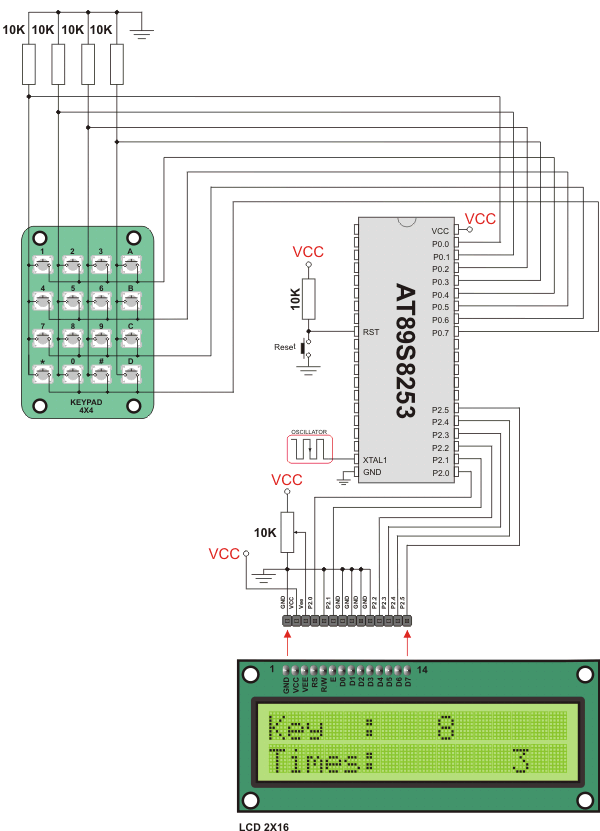
4x4 Keypad connection scheme
What do you think about this topic ? Send us feedback!
Find them on
