


Sound Library
The mikroC PRO for AVR provides a Sound Library to supply users with routines necessary for sound signalization in their applications. Sound generation needs additional hardware, such as piezo-speaker (example of piezo-speaker interface is given on the schematic at the bottom of this page).
Library Routines
Sound_Init
| Prototype |
void Sound_Init(char *snd_port, char snd_pin); |
|---|---|
| Returns |
Nothing. |
| Description |
Configures the appropriate MCU pin for sound generation. Parameters :
|
| Requires |
Nothing. |
| Example |
// Initialize the pin RC3 for playing sound Sound_Init(&PORTC, 3); |
Sound_Play
| Prototype |
void Sound_Play(unsigned freq_in_hz, unsigned duration_ms); |
|---|---|
| Returns |
Nothing. |
| Description |
Generates the square wave signal on the appropriate pin. Parameters :
 Note :
Frequency range is limited by Delay_Cyc parameter. Maximum frequency that can be produced by this function is Note :
Frequency range is limited by Delay_Cyc parameter. Maximum frequency that can be produced by this function is Freq_max = Fosc/(80*3). Minimum frequency is Freq_min = Fosc/(80*255). Generated frequency may differ from the freq_in_hz parameter due to integer arithmetics.
|
| Requires |
In order to hear the sound, you need a piezo speaker (or other hardware) on designated port. Also, you must call Sound_Init to prepare hardware for output before using this function. |
| Example |
// Play sound of 1KHz in duration of 100ms Sound_Play(1000, 100); |
Library Example
The example is a simple demonstration of how to use the Sound Library for playing tones on a piezo speaker.

void Tone1() {
  Sound_Play(659, 250);   // Frequency = 659Hz, duration = 250ms
}

void Tone2() {
  Sound_Play(698, 250);   // Frequency = 698Hz, duration = 250ms
}

void Tone3() {
  Sound_Play(784, 250);   // Frequency = 784Hz, duration = 250ms
}

void Melody() {                              // Plays the melody "Yellow house"
  Tone1(); Tone2(); Tone3(); Tone3();
  Tone1(); Tone2(); Tone3(); Tone3();
  Tone1(); Tone2(); Tone3();
  Tone1(); Tone2(); Tone3(); Tone3();
  Tone1(); Tone2(); Tone3();
  Tone3(); Tone3(); Tone2(); Tone2(); Tone1();
}

void ToneA() {
  Sound_Play( 880, 50);
}
void ToneC() {
  Sound_Play(1046, 50);
}
void ToneE() {
  Sound_Play(1318, 50);
}

void Melody2() {                // Plays Melody2
 unsigned short i;
  for (i = 9; i > 0; i--) {
    ToneA();
    ToneC();
    ToneE();
    }
}

void main() {

  DDRB = 0x00;                   // Configure PORTB as input
  Sound_Init(&PORTC,3);                  // Initialize sound pin

  Sound_Play(880, 1000);         // Play sound at 880Hz for 1 second

  while (1) {                    // endless loop

    if (PINB7_bit)               // If PORTB.7 is pressed play Tone1
      Tone1();                   //
    while (PINB7_bit) ;          // Wait for button to be released

    if (PINB6_bit)               // If PORTB.6 is pressed play Tone2
      Tone2();                   //
    while (PINB6_bit) ;          // Wait for button to be released

    if (PINB5_bit)               // If PORTB.5 is pressed play Tone3
      Tone3();                   //
    while (PINB5_bit) ;          // Wait for button to be released

    if (PINB4_bit)               // If PORTB.4 is pressed play Melody2
      Melody2();                 //
    while (PINB4_bit) ;          // Wait for button to be released

    if (PINB3_bit)               // If PORTB.3 is pressed play Melody
      Melody();                  //
    while (PINB3_bit) ;          // Wait for button to be released
  }
}
HW Connection
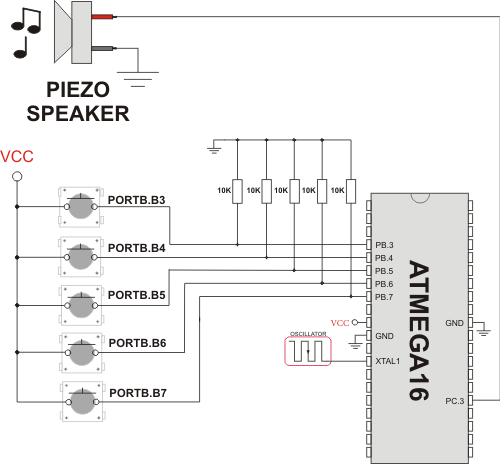
Example of Sound Library connection
What do you think about this topic ? Send us feedback!
Find them on
